Tools & Accessories
Chapter 8 — Core Switch Security Hardening Design Guide
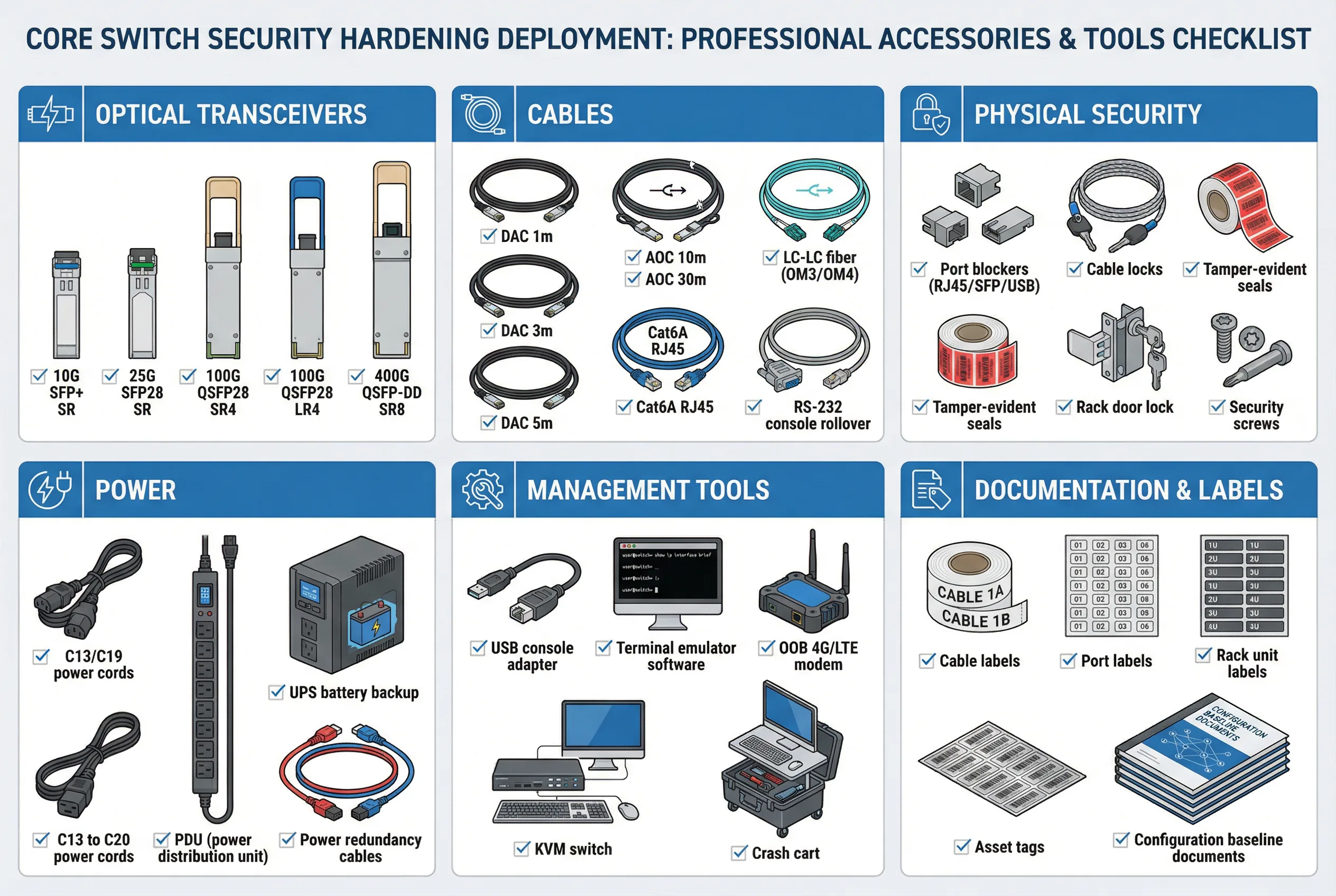
Successful core switch security hardening requires not only the right configuration and supporting infrastructure, but also the appropriate physical tools, accessories, and consumables. These items span six categories: optical transceivers for high-speed connectivity, cables for physical connections, physical security accessories to prevent unauthorized access, power infrastructure for redundancy, management tools for emergency access, and documentation and labeling materials for operational clarity. Procuring and staging these items before deployment begins prevents delays and ensures that all hardening controls can be implemented as designed.
The accessories checklist diagram below provides a comprehensive visual reference for all required items, organized by category. Each item is accompanied by a checkbox to facilitate pre-deployment verification. This checklist should be reviewed and signed off by the deployment team lead before installation begins.
8.1 Accessories and Tools Checklist
8.2 Optical Transceiver Selection Guide
Optical transceiver selection must account for link distance, fiber type, and port compatibility. Using incorrect transceivers can result in link failures, intermittent errors, or security vulnerabilities if counterfeit modules are used. All transceivers must be sourced from approved vendors and verified against the switch's compatibility matrix before installation.
| Form Factor | Speed | Typical Use Case | Max Distance (OM4) | Max Distance (SMF) | Security Note |
|---|---|---|---|---|---|
| SFP+ | 10G | Legacy uplinks; management connections | 400m (SR) | 10km (LR) | Verify vendor compatibility; avoid counterfeit modules |
| SFP28 | 25G | Server-to-leaf connections; distribution uplinks | 100m (SR) | 10km (LR) | Verify DOM (Digital Optical Monitoring) support |
| QSFP28 | 100G | Core-to-distribution; MLAG peer-link; firewall uplinks | 100m (SR4) | 10km (LR4) | Verify ASIC compatibility; check power budget |
| QSFP-DD / OSFP | 400G | Hyperscale data center spine-leaf; high-density core | 100m (SR8) | 10km (LR8) | Verify chassis power budget; thermal management |
| DAC (Direct Attach Copper) | 10G/25G/100G | Short-reach connections within same rack or adjacent racks | 5m (passive) / 15m (active) | N/A | Verify length; passive DAC preferred for <3m |
| AOC (Active Optical Cable) | 10G/25G/100G | Medium-reach connections between racks; MLAG peer-link | 30m–100m | N/A | Verify bend radius; protect from physical damage |
8.3 Physical Security Accessories
Physical security accessories prevent unauthorized physical access to the core switch, which could allow an attacker to bypass all software-based security controls. These accessories must be installed before the device is placed into production service and must be inspected regularly to verify they have not been tampered with.
| Accessory | Purpose | Installation Location | Inspection Frequency |
|---|---|---|---|
| RJ45 Port Blockers | Prevent insertion of unauthorized devices into unused RJ45 ports | All unused management and console ports | Monthly visual inspection |
| SFP/QSFP Port Blockers | Prevent insertion of unauthorized transceivers into unused optical ports | All unused SFP/QSFP ports | Monthly visual inspection |
| USB Port Blockers | Prevent USB boot attacks and unauthorized USB device insertion | All USB ports (front and rear) | Monthly visual inspection |
| Tamper-Evident Seals | Detect unauthorized physical access to chassis covers and panels | All chassis access panels; cable management covers | Quarterly inspection; replace if broken |
| Rack Door Lock | Prevent unauthorized access to the rack containing core switches | Front and rear rack doors | Verify lock integrity monthly; audit key access quarterly |
| Cable Locks | Prevent unauthorized removal of critical cables (power, management) | Power cords; management cables; console cables | Monthly visual inspection |
| Security Screws | Prevent unauthorized removal of chassis panels using standard tools | All chassis panel screws | Quarterly inspection |
8.4 Management and Emergency Access Tools
Emergency access tools are critical for recovering from management plane failures, software crashes, or misconfiguration events that lock out normal management access. These tools must be staged and tested before deployment, and the procedures for using them must be documented and accessible to the on-call team without requiring network access.
| Tool | Purpose | Storage Location | Testing Requirement |
|---|---|---|---|
| USB Console Adapter (USB-to-Serial) | Connect laptop to console port for emergency access | On-site emergency kit; NOC spare parts cabinet | Test connectivity quarterly; verify driver compatibility |
| Terminal Emulator Software | PuTTY, SecureCRT, or equivalent for console access | Pre-installed on crash cart laptop; emergency USB drive | Verify version and settings quarterly |
| OOB 4G/LTE Modem | Cellular backup for OOB management when all network links fail | Connected to OOB management switch; SIM card pre-provisioned | Test cellular connectivity monthly; verify SIM validity |
| KVM Switch | Share keyboard/video/mouse between multiple devices for emergency access | OOB management rack | Verify connectivity to all managed devices quarterly |
| Crash Cart | Mobile emergency access station with laptop, cables, and tools | NOC or data center operations area; immediately accessible | Verify all components functional monthly; update software quarterly |
| Emergency Config USB Drive | Bootable USB with known-good configuration for emergency recovery | Physical safe; separate from normal operations area | Verify config currency monthly; test boot process quarterly |